


Cars.com: Buy and sell cars review
 Analysis by GetAllApps
I would treat Cars.com as a practical starting point for a car search, not as a substitute for checking a vehicle and its seller carefully. Its main appeal is bringing vehicle listings and shopping tools into one mobile app; the important question is how much of the decision you want to make on a screen before seeing a car in person. In my view, it is most useful for narrowing a broad search and keeping candidate vehicles organized, while the final checks still belong to you.
Useful reach, with sensible limits
Cars.com is a free Auto & Vehicles app from Cars.com, aimed at people browsing, comparing, tracking, or selling cars. It has a 4.7 average from around 213,000 ratings and has been installed over 10 million times. Those figures suggest that it is an established tool for a common task, but they do not tell me whether a particular listing is current or whether a particular seller is dependable. I would use the app to find options, then verify the details that matter before spending time or money.
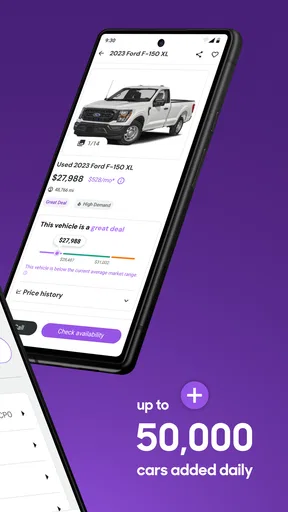
The app’s scale is a real convenience when your search is still open-ended. Rather than beginning with one dealer’s inventory or a handful of classified ads, you can explore many vehicles and start forming a shortlist around your needs. That is especially helpful if you are moving to a new area, replacing a car on a deadline, or trying to understand what is available before setting a budget. The trade-off is that a large selection can make browsing feel productive even when you have not yet decided what you actually need.
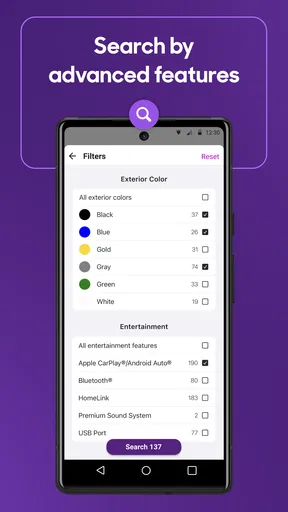
For that reason, I would start with a short list of non-negotiables: body style, seating, intended use, and a realistic spending limit. Then I would compare a smaller set of plausible candidates instead of scrolling through every appealing result. A listing can look like a good match while leaving out details you need for a confident decision, so I treat the app as a way to find questions to ask—not as proof that a car is right for me.
Trust begins with what you can check
Buying a vehicle involves personal information and a substantial financial decision, so I pay attention to what is visible and what I can control. Cars.com is useful as a search and listing app, but a listing should not be mistaken for an independent inspection. I would check the seller’s answers against the actual car, confirm the vehicle identification details where appropriate, and arrange an in-person review or a qualified inspection before agreeing to buy.
The same caution applies when selling. A listing can help put your car in front of potential shoppers, but it cannot establish that every inquiry is genuine or that every proposed arrangement is safe. I would keep early communication focused on the vehicle and avoid sharing unnecessary personal or financial details. Before handing over keys or documents, I would independently confirm payment and follow the relevant local procedures for transferring ownership.
That distinction is not a criticism unique to this app; it is the nature of a marketplace. Cars.com can help you discover an opportunity, but the responsibility for checking the vehicle, the terms, and the other party remains with you. I find this framing more useful than treating a polished listing or a strong app reputation as a guarantee.
Make the search work for your real routine
A useful way to browse is to separate “interesting” from “worth contacting.” If I were shopping for a family car, I would first collect a few candidates that meet the space and use requirements, then compare them side by side in my own notes: asking price, mileage shown, location, condition claims, and questions still unanswered. I would not rely on memory after looking at several similar vehicles. A simple written comparison makes it easier to notice when a seemingly attractive listing is missing information that another seller provides.
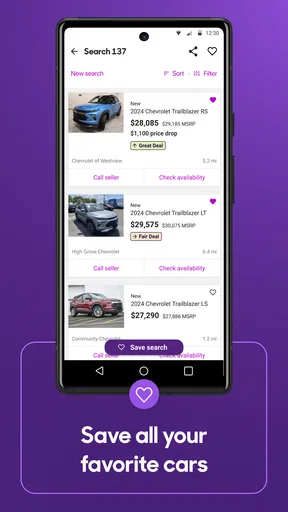
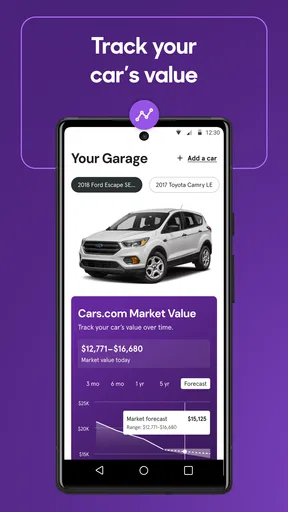
Tracking listings is most valuable when a search spans several days rather than one sitting. I would save only cars I might genuinely travel to see, then revisit them with a specific purpose: check whether the listing is still available, look for changes, and decide what I need to ask next. This avoids turning a saved list into a scrapbook of possibilities. It also helps keep the decision grounded in practical constraints such as travel time and the cost of arranging a visit.
There is a useful trade-off here: broad browsing helps you learn the market, while a narrow shortlist helps you act. I would use the app broadly at first, then become stricter as soon as I have enough examples to understand the choices. If a vehicle looks unusually appealing, I would not let that excitement replace routine checks. I would ask about its history and condition, clarify any vague claims, and make sure the exact vehicle I inspect matches the one described in the listing.
What changes when you are selling
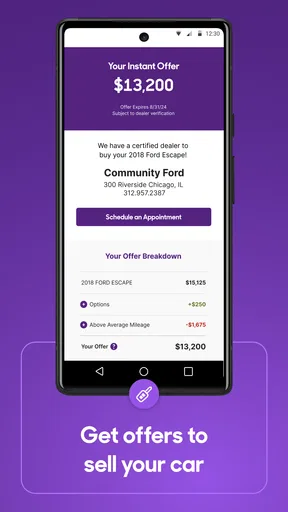
For an owner preparing to sell, the app’s value is not just putting a car in front of buyers; it can also help you think like a shopper. Before composing a listing, I would look at comparable vehicles and note which details make comparisons meaningful. Accurate, specific information is more useful than broad praise. Clear photographs and an honest account of known issues can help set expectations and reduce wasted conversations, though they do not guarantee a faster sale.
I would also decide in advance how much contact information I am comfortable sharing and what questions I will answer before arranging a viewing. Keep a record of the vehicle details and the terms discussed, and be wary of pressure to move quickly or to accept an arrangement you cannot independently verify. Those are general precautions for private vehicle sales, not special protections supplied by an app. The app can support the listing process, but a careful seller still needs a plan for screening inquiries and completing the transaction safely.
If you simply want a dealer to handle the process, or you prefer a service that takes responsibility for inspection, paperwork, or negotiation, a marketplace app may not be enough. Cars.com is better suited to people willing to compare options and manage their own follow-up. I would not choose it expecting a hands-off buying or selling experience.
Privacy and control deserve a deliberate look
One of the most important moments to pause is before creating an account or sharing details. I would read the app’s current privacy information and review the choices presented during setup rather than tapping through automatically. On any app, permissions should be considered in context: allow only what you understand and need for the action you are taking, and revisit device settings if your comfort level changes. I would not assume a permission is required simply because an app requests it.
There is also a difference between browsing vehicles and contacting a seller. Browsing can be a low-commitment way to learn what is available; sending an inquiry can reveal contact details and start a conversation. I would move to that step only when I have a concrete question and a real interest in the vehicle. If I am only comparing broad price ranges, I would keep my search general and avoid sharing more than necessary.
Account controls matter after the initial search, too. I would check the app’s settings and the account options available to me, especially if I have saved searches or listings I no longer need. If I decide to stop using the service, I would look for the appropriate account-management process and review what choices are offered there. These are practical habits rather than claims about a particular data policy: the exact controls and terms should be read in the app itself as they can change over time.
Where it sits beside other ways to shop
Compared with visiting dealership sites one by one, a broad marketplace can make discovery and comparison less fragmented. Compared with general classified listings, a vehicle-focused app gives the search a clearer purpose. But the alternatives can be better in specific situations. A local dealer’s own inventory may be more direct if you already know where you want to buy; a specialist service may suit you if you want help with inspections or paperwork; and a trusted mechanic or knowledgeable friend can add judgment that no listing interface can replace.
I would also avoid assuming that one app contains every car worth considering. Inventory, listing quality, and seller responsiveness can vary, and a search that returns few suitable matches may reflect the scope of the search rather than a lack of vehicles overall. If you are not finding what you need, broaden the radius or criteria carefully, then compare with other sources. Be wary of loosening an important requirement just to make the results page look fuller.
Who will get the most from it
I think Cars.com makes the most sense for a shopper who wants to explore many possibilities, keep candidates in view, and take an active role in follow-up. It can also suit a private seller who is prepared to present a vehicle clearly and handle inquiries with care. It is less compelling for someone who wants a fully managed transaction, needs a guarantee about a vehicle’s condition, or is uncomfortable evaluating listings and communicating with sellers.
The app is rated for Everyone, and it is free to install. Its current version is 26.20.0, with a minimum operating-system requirement of 11. I mention that because compatibility and cost are basic practical questions before you build a search routine around an app. The rating does not remove the need for adult judgment around negotiations, personal information, and vehicle checks; a general audience label is not a safety endorsement of individual listings.
A cautious recommendation
After weighing its role, I would recommend Cars.com as a discovery and organization tool, especially if you are willing to verify what you find. Its strongest use is helping turn a vague goal—“I need another car”—into a manageable shortlist and a set of concrete questions. Its weak point is the temptation to treat convenient browsing as due diligence. The app can make searching easier, but it cannot make the decision for you.
My practical approach would be to set clear criteria, save only serious candidates, compare their details outside the excitement of the moment, and contact sellers when I know what I need to ask. Before committing, I would inspect the exact vehicle, verify important claims, and use safe procedures for payment and ownership transfer. If you want to do that work yourself, Cars.com is a sensible place to begin. If you want someone else to take responsibility for the checks and transaction, I would look for a service built around that support instead.
Pros and cons
Pros
- Save favorite listings to compare later.
- Contact sellers directly from a vehicle listing.
- Search by make model price and location.
- View vehicle history reports on eligible listings.
- Get alerts when matching cars are added or updated.
Cons
- Listing details can be incomplete or outdated.
- Some features require location access.
- Vehicle history reports may not be available for every car.
- Dealer listings can include extra fees not shown upfront.
- App availability and features may vary by region.


